
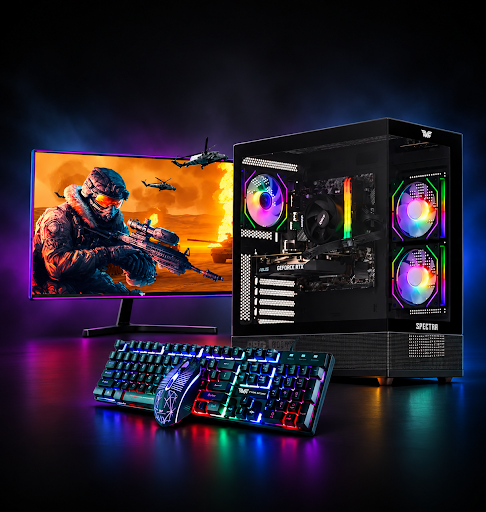
Picture the moment you open the box. Everything you need is right there: the gaming PC, monitor, keyboard and mouse. You connect everything, switch on the system and start playing without spending hours researching individual components.
That is the convenience of a gaming PC bundle, and it can be an excellent option for beginners and experienced players alike. However, not every bundle offers the same value. Some include useful accessories, while others may contain basic equipment that you will want to replace later.
The difference comes down to knowing what you are buying. Whether you are comparing gaming bundle deals or planning your first gaming setup, these seven checks will help you make a more informed decision. Veno Scorp offers a range of gaming PCs and bundles worth exploring when comparing your options.
Check 1: What Is Actually Included in the Bundle?
Never judge a gaming PC bundle by its headline or product image alone. Open the product listing and check exactly what comes with the system.
A typical gaming PC monitor keyboard mouse bundle may include:
- A prebuilt gaming PC tower
- A gaming monitor
- A keyboard
- A gaming mouse
- Power and connection cables
Some packages also include a headset, mouse mat or additional monitor. Others may only provide the essential equipment.
Before purchasing, ask yourself:
- Does the bundle include everything needed to start gaming?
- Are the monitor, keyboard and mouse included in the advertised price?
- Are any additional accessories listed separately?
- Are there any items included that I am unlikely to use?
If the product description is unclear, contact the seller before placing your order. A detailed listing makes it easier to understand exactly what you are paying for.
Check 2: Does the Gaming PC Match the Monitor?
This is one of the most important checks when choosing a bundle. A powerful gaming PC paired with a basic monitor may not deliver the experience you expect. Similarly, an advanced display connected to a modest system may not reach its full potential.
Check three important monitor specifications:
- Resolution: 1080p is suitable for many entry-level and competitive gaming setups, while 1440p provides additional detail. 4K offers even sharper visuals but requires more graphics processing power.
- Refresh rate: A 144Hz monitor can provide smoother motion than a standard 60Hz display, provided your PC can produce enough frames.
- Screen size: A 24-inch monitor is a practical choice for smaller desks, while a 27-inch display offers more viewing space.
Your graphics card should be capable of supporting the monitor’s resolution and refresh rate. Veno Scorp’s guides to 1080p gaming PCs and 1440p gaming PCs can help you understand how system performance relates to display requirements.
Pro tip: Always check the monitor specifications before purchasing. Screen size alone does not tell you whether a display is suitable for your gaming requirements.
Check 3: Do the Sums Add Up?
Gaming bundle deals can offer convenience and good value, but the advertised price does not automatically mean you are saving money.
Compare the bundle with the cost of purchasing each item separately.
Follow this simple process:
- Find the price of the gaming PC on its own.
- Compare suitable monitors available separately.
- Check the prices of comparable keyboards and mice.
- Add the individual prices together.
- Compare the total with the bundle price.
You can explore Veno Scorp’s gaming monitors and gaming keyboards and mice to understand the different options available.
Make sure your comparison is fair. A basic keyboard should not be compared with a premium mechanical model, and a standard 60Hz monitor is not equivalent to a high-refresh-rate display.
The goal is to understand the overall value rather than focus only on the discount advertised.
Check 4: Will You Actually Use the Included Accessories?
Bundled accessories can be useful when setting up a new gaming station, but they may not suit everyone’s preferences.
For example, one player may prefer a compact keyboard, while another may want a full-sized mechanical model. Some gamers also prefer lightweight mice or headsets with specific audio features.
Think about whether you would be comfortable using the included accessories for several months.
If you already own a good keyboard, mouse and monitor, paying for another set may not make financial sense. In that situation, purchasing a standalone gaming PC could be a more practical option.
However, if you are starting from scratch, having the essential accessories included can save time and make the buying process simpler.
Check 5: Can You Customise the Bundle?
Sometimes a gaming PC bundle is almost perfect, but one specification does not match your requirements. You may want additional RAM, more storage or a different graphics card.
Some sellers offer customisation options before dispatch, allowing buyers to adjust selected components.
Before ordering, check:
- Can the memory capacity be increased?
- Is additional SSD storage available?
- Can the graphics card or processor be changed?
- Will customisation affect the delivery time?
- Does changing a component increase the overall price?
Explore the available gaming PC bundles from Veno Scorp and check which specifications suit your needs.
If you are unsure about a particular component, contact the seller before making changes. Confirming the details in advance can prevent compatibility issues later.
Check 6: What Happens If Something Goes Wrong?
Warranty and after-sales support are important when buying a gaming PC bundle. Although nobody expects their new equipment to develop a fault, understanding the support process can make ownership easier.
Before purchasing, review the following:
- Warranty coverage: Check how long the warranty lasts, which components are covered and how claims are handled. Veno Scorp’s warranty information provides details worth reviewing.
- Returns policy: Read the return policy so you understand the conditions and process for returning products.
- Consumer rights: UK consumer protection law, including the Consumer Rights Act 2015, provides important protections when purchasing goods.
Remember that a bundle contains several separate items. Check whether the warranty information covers the PC tower, monitor and accessories, or whether different terms apply to individual products.
Clear warranty and returns information should be part of your buying decision, not something you check only after a problem occurs.
Check 7: Will the Gaming PC Still Suit You in a Year?
A good gaming PC bundle should meet your current requirements while offering some flexibility for the future.
You may want to install larger games, run demanding applications or upgrade your system as your gaming preferences change.
Before choosing a bundle, consider whether the PC allows future upgrades such as:
- Increasing RAM capacity
- Adding another SSD
- Replacing the graphics card
- Upgrading the processor, where supported
- Improving the cooling system
Also check whether the power supply and case have enough capacity for potential hardware changes.
If you want to understand the different upgrade options, Veno Scorp’s PC components collection provides a starting point for exploring available hardware.
Quick Verdict: Is a Gaming PC Bundle Right for You?
Not every buyer needs a complete bundle. The right option depends on what equipment you already own and how you plan to use your gaming PC.
| Your situation | Option worth considering |
| Moving from console gaming with no PC equipment | Gaming PC bundle |
| Buying a first gaming setup | Starter gaming PC bundle |
| Purchasing a gift for a beginner | Bundle, after checking the contents |
| Already owning a good monitor and peripherals | Standalone gaming PC |
| Wanting to select every accessory yourself | Standalone PC with separate accessories |
| Planning to spread the purchase cost | Compare bundles and standalone options, including available finance options and their terms |
This comparison can help narrow down your choices before you start looking at individual products.
Your First Hour With a New Gaming PC Bundle
Once your bundle arrives, a few simple steps can help you get everything running correctly.
- Check the contents: Compare everything in the box with the product listing and inspect the equipment for any visible damage.
- Connect the monitor correctly: If your PC has a dedicated graphics card, connect the monitor to its graphics card output rather than the motherboard’s display port.
- Set the refresh rate: Open Windows display settings and select the highest refresh rate supported by your monitor.
- Update graphics drivers: Install the latest compatible graphics drivers before starting demanding games.
- Check your internet connection: A wired Ethernet connection can provide more consistent network performance than Wi-Fi in many home setups.
Did you know? Connecting your monitor to the wrong display output is a common setup mistake. If your gaming PC has a dedicated graphics card, use its HDMI or DisplayPort connection to get the intended graphics performance.
If delivery speed is important, explore Veno Scorp’s next-day gaming PCs and check the availability and delivery terms. Once your system is ready, a suitable gaming headset can also complete your setup.
Make the Right Choice Before Buying
A gaming PC bundle is not automatically a bargain, but it can be a convenient way to get everything needed for a complete gaming setup.
The important thing is to check what is included, match the monitor with the PC, compare individual prices and understand the warranty terms. You should also consider whether the system offers enough flexibility for future upgrades.
Taking a few minutes to review these details can help you avoid unnecessary expenses and choose equipment that suits your gaming requirements.
Veno Scorp offers gaming PC bundles, individual gaming systems and components for different types of players. Explore the available gaming PC bundles or browse the wider range of gaming PCs to compare your options.
Frequently Asked Questions
1. What is a gaming PC bundle?
A gaming PC bundle is a package that combines a prebuilt gaming computer with accessories such as a monitor, keyboard and mouse. Some bundles also include headsets and other gaming equipment. Always check the product description to confirm what is included.
2. Are gaming PC bundle deals really cheaper?
They can offer good value, but it depends on the components and accessories included. Compare the bundle price with the cost of purchasing similar products separately before deciding.
3. Is a starter gaming PC bundle good for beginners?
Yes. A starter gaming PC bundle can make it easier for beginners to get a complete setup without researching every component individually. Check that the PC and monitor meet the requirements of the games you want to play.
4. Can I upgrade a gaming PC bundle later?
Most upgradeable gaming PCs allow changes such as adding RAM, increasing storage or replacing the graphics card. However, compatibility depends on the motherboard, power supply, case and existing hardware.
5. What should I check before buying a gaming PC bundle?
Check the complete list of included items, PC specifications, monitor resolution and refresh rate, total price, customisation options, warranty, returns policy and future upgrade possibilities. These details help you understand whether the bundle is suitable for your needs.